
68 NiuNiu Top-Up Guide
68 NiuNiu Top-Up offers deposit methods such as QR code scanning, bank transfer, FPX online banking and automatic deposit QR, each with its own amount range and process. Users first select a deposit method on the top-up page and enter the amount, then complete payment according to the on-screen instructions; bank transfer requires paying to the receiving details provided by the system with the transfer remark, then uploading proof of payment, while FPX and automatic deposit QR are credited automatically once payment is completed. The page also notes that a one-time turnover is enough to withdraw.
68 NiuNiu Top-Up Methods and Amount Ranges
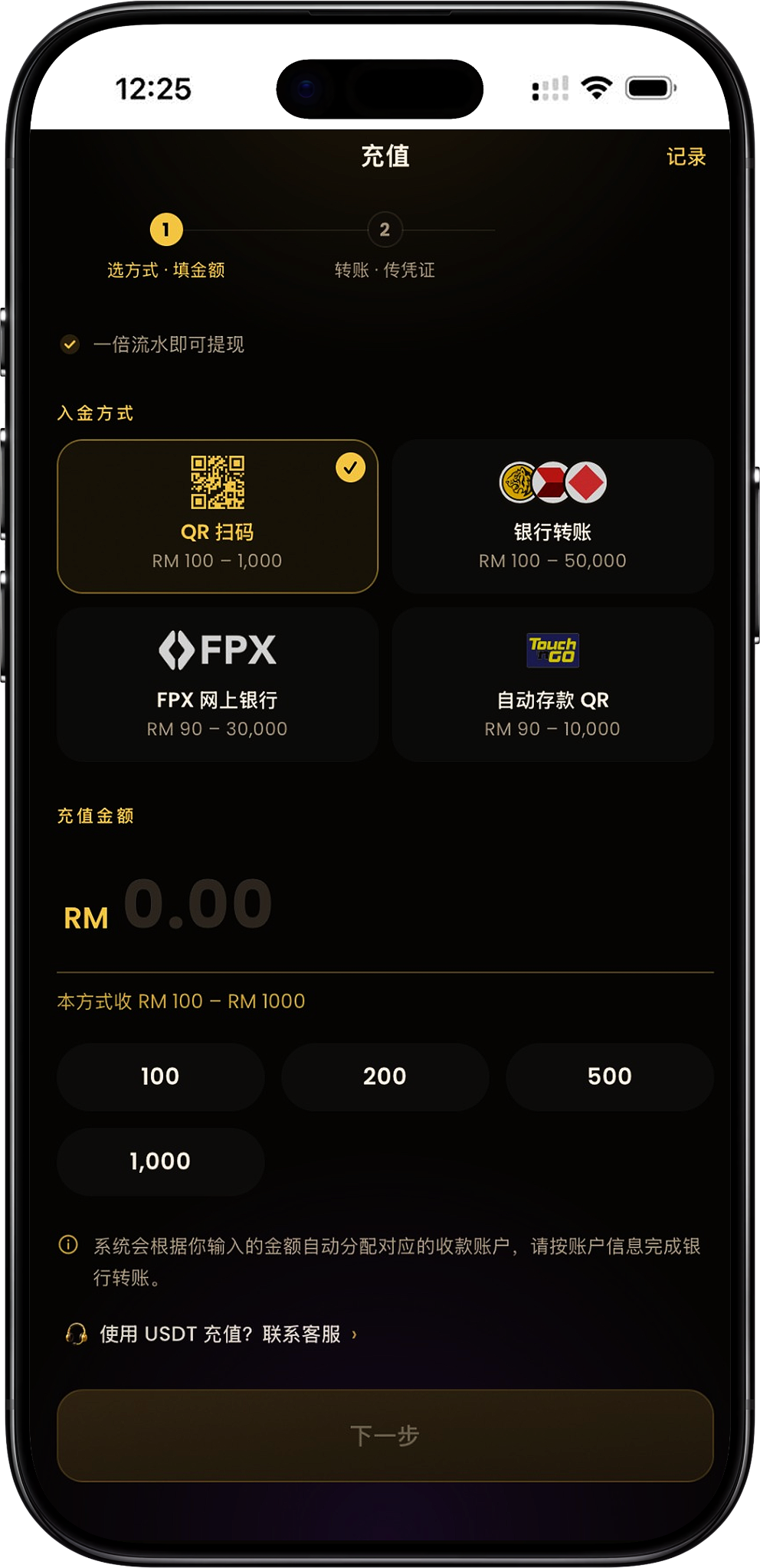
The 68 NiuNiu top-up page currently offers four main deposit methods: QR code scanning, bank transfer, FPX online banking and automatic deposit QR. Before choosing a method, confirm its minimum and maximum top-up amount first, as the accepted range differs between channels.
QR Code Scan: RM100–RM1,000
QR code scanning currently supports RM100 to RM1,000. After selecting it, enter a top-up amount within this range, then proceed to the next step to get the payment QR code and related transfer details provided by the system.
Bank Transfer: RM100–RM100,000
Bank transfer currently supports RM100 to RM100,000, suitable for users who want to complete the transfer through a bank account. The system will provide the corresponding receiving account details based on the amount entered.
FPX Online Banking: RM90–RM30,000
FPX online banking supports top-ups from RM90 to RM30,000. Users can select a supported bank and will be redirected to online banking to pay; once completed, the funds are credited automatically with no need to upload proof of payment.
Automatic Deposit QR: RM90–RM10,000
Automatic deposit QR currently supports RM90 to RM10,000. After the user completes payment by scanning the QR code provided on the page, the system processes the credit automatically, with no need to upload proof of payment.
QR Code Scan Top-Up Steps
Topping up by QR code scan has two main stages: choosing the amount and completing the transfer. Users should follow the receiving QR code, bank details and transfer remark generated on the top-up page exactly to complete payment, then return to the page to upload proof after the transfer.
Step 1: Select QR Code Scan
After entering the 68 NiuNiu top-up page, select "QR Code Scan" under "Deposit Method". This method currently supports RM100 to RM1,000.
Step 2: Enter the Top-Up Amount
Enter the amount you want to top up, or choose one of the quick amounts provided on the page. Once you've confirmed the amount is within the QR code scan range, click "Next" to proceed to the payment stage.
Step 3: Scan the Payment QR Code
The next page will show the amount due and the payment QR code. Use a bank or payment app that supports this payment method to scan the QR code, and confirm the actual transfer amount matches what's shown on the page.
Step 4: Check the Receiving Details and Transfer Remark
The page will also show the receiving bank, account name, account number and the "transfer remark" specific to this transaction. Check each item before paying, and fill in the remark for this order exactly as shown on the page.
Step 5: Transfer From an Account Under Your Verified Name
Top-ups must be paid from a bank account under the same name as your real-name verification. The page clearly states that if the top-up bank account name doesn't match your verified name, the funds may not be received properly, so confirm the name before transferring.
Step 6: Upload Proof of Payment
After payment, return to the top-up page, tap to select proof of payment and upload a screenshot or photo of the payment. The page supports choosing images from your photo album, and they're compressed automatically on submission.
Step 7: Submit and Wait for Verification
After uploading the proof, continue submitting as prompted on the page. The backend will verify the payment details and proof before processing the top-up, so don't leave right after paying without uploading the proof.
Bank Transfer Top-Up Steps
Bank transfer top-up lets users pay directly from their bank account to the receiving account designated by the system. The current range is RM100 to RM100,000; the key is to accurately enter the amount, the receiving account number, and the transfer remark for this order.
Step 1: Select Bank Transfer
Select "Bank Transfer" on the top-up page and confirm the range shown is RM100 to RM100,000.
Step 2: Enter the Top-Up Amount
Enter the RM amount you plan to transfer. The system will automatically assign a receiving account based on the amount entered, so confirm the amount is correct before clicking Next.
Step 3: View the Assigned Receiving Account
The page will show the receiving bank, account name, account number and the transfer remark for this order. Use the copy function on the page when needed to avoid manual entry errors.
Step 4: Pay via DuitNow or Bank Transfer
Using the details provided by the system, initiate the transfer from your own banking app, and make sure the receiving account number and amount match the top-up page.
Step 5: Enter the Order Number Exactly as the Transfer Remark
When paying, enter the "transfer remark" shown on the page exactly as it appears into your bank's remarks or Reference field. The page specifically notes that the remark must be the order number — an incorrect or missing remark may prevent the payment from being matched to your account.
Step 6: Confirm the Paying Account Matches Your Verified Name
Bank transfers must be made from an account under the same name as your real-name verification. Check the bank account name before submitting payment to avoid delays caused by a name mismatch.
Step 7: Upload Proof After the Transfer
After payment, return to the 68 NiuNiu top-up page to upload proof of the transfer. The page clearly reminds you to come back and submit the proof, otherwise the backend will not be able to review this payment.
FPX Online Banking Top-Up Steps
FPX online banking top-up redirects you directly to your bank to pay, and currently supports RM90 to RM30,000. Once the user selects a bank and completes the FPX payment, the system processes the credit automatically, so there's no need to upload proof of payment in this flow.
Step 1: Select FPX Online Banking
Tap "FPX Online Banking" on the top-up page and confirm the current amount range is RM90 to RM30,000.
Step 2: Enter the Top-Up Amount
Enter a top-up amount within the FPX range, or choose a suitable amount from the quick amounts provided on the page.
Step 3: Select Your Payment Bank
The page will list the online banks currently available, such as Malayan Banking, CIMB Bank, Public Bank, RHB Bank, Hong Leong Bank, Alliance Bank Malaysia, Bank Simpanan Nasional and Affin Bank, among others — the actual list shown on the page at the time prevails.
Step 4: Click Next to Proceed to Payment
After confirming the bank and top-up amount, click "Next · Proceed to Payment" and the system will redirect you to the corresponding FPX online banking flow.
Step 5: Complete Payment in Online Banking
Complete verification and payment as required on your bank's page, and confirm the actual amount paid matches the top-up order.
Step 6: Funds Are Credited Automatically After Payment
The FPX page states that funds are credited automatically once payment is complete, with no need to upload proof of payment. After paying, you can return to the platform to check the top-up status and records.
Automatic Deposit QR Top-Up Steps
Automatic deposit QR is another scan-to-pay method, currently covering RM90 to RM10,000. Unlike the QR code scan method, which requires manually uploading proof, automatic deposit QR credits the funds automatically once the scanned payment is complete.
Step 1: Select Automatic Deposit QR
Select "Automatic Deposit QR" on the top-up page and confirm the range shown is RM90 to RM10,000.
Step 2: Enter the Top-Up Amount
Enter the amount for this top-up, making sure it's within the range supported by this method. The page also offers common amounts for quick selection.
Step 3: Click Next to Proceed to Payment
After confirming the amount, click "Next · Proceed to Payment" and the system will enter the corresponding QR code payment flow.
Step 4: Scan the QR Code to Complete Payment
Use an app that supports QR code payments to scan the payment code shown by the system, and complete payment as guided on the payment page.
Step 5: Wait for the System to Credit Your Account Automatically
The page states that automatic deposit QR is credited automatically once the scanned payment is complete, so there's no need to upload proof of payment.
Top-Up Remarks, Real-Name Account and Proof of Payment Requirements
When using a transfer method that requires manual verification, correctly filling in the remark, paying from an account under your verified name, and uploading proof of payment are all important steps. Any mistake in these details may prevent the system from matching the payment to the correct 68 NiuNiu account.
The Transfer Remark Should Only Contain the System Order Number
The page requires the order number to be entered exactly as it appears in the transfer remark generated for this top-up, without rewriting it or adding other text. This applies especially to the bank's Reference field — always use the information currently generated on the page.
Do Not Enter Sensitive or Unrelated Remarks
The page specifically warns against including sensitive or unrelated words in the remark, such as investment, cryptocurrency, commission, tax payment, mall, Topup, Bet, Jackpot, Lottery, Win, the platform name or an exchange name — only the order number required by the system should be entered.
You Must Use an Account Under Your Verified Name
When topping up by bank transfer or similar methods, the paying account name must match your real-name verification. Check the name before transferring to avoid paying from someone else's bank account.
If Proof Is Required, You Must Return to Upload It
If the current payment flow requires proof, you need to return to the top-up page after completing the bank transfer and submit an image of the transfer. Whether proof is required depends on the on-page instructions for the top-up method you selected.
You Can Check Top-Up Status in Records
The top-up page provides a "Records" link in the top-right corner, where users can view related top-up records and status after completing a top-up.
USDT Top-Up Instructions
The top-up page also provides a "Want to top up with USDT? Contact Customer Service" link. The current page does not show a fixed USDT deposit address, amount range or complete self-service steps, so for USDT top-ups, contact platform customer service directly for the current instructions.
USDT Does Not Use the Regular Bank Top-Up Flow
The current USDT entry point is separate from QR, bank transfer, FPX and automatic deposit QR, so you should not use a regular bank receiving account for a USDT top-up.
Contact Customer Service Before Topping Up
If you need to use USDT, contact Support through the customer service link on the top-up page, and proceed according to the information provided by customer service and the platform at the time.
68 NiuNiu Top-Up FAQ
What top-up methods does 68 NiuNiu offer?
The current top-up page offers QR code scanning, bank transfer, FPX online banking and automatic deposit QR, along with a USDT contact-customer-service link.
What is the minimum top-up amount for 68 NiuNiu?
The minimum amount depends on the channel you choose. QR code scan and bank transfer have a minimum of RM100; FPX online banking and automatic deposit QR currently have a minimum of RM90.
What is the maximum top-up amount for bank transfer?
The bank transfer page currently shows a range of RM100 to RM100,000, so the maximum displayed amount is RM100,000.
What is the top-up range for QR code scanning?
The regular QR code scan method currently supports RM100 to RM1,000.
What is the top-up range for FPX?
FPX online banking currently supports RM90 to RM30,000.
What is the top-up range for automatic deposit QR?
Automatic deposit QR currently shows RM90 to RM10,000.
Is a remark required for bank transfer?
Yes. The page requires the "transfer remark" for this order to be entered exactly as shown into the bank's remarks or Reference field. A missing or incorrect entry may prevent the payment from being matched correctly.
Do I need to upload proof for bank transfer?
Yes. After completing the transfer, return to the top-up page to select and upload proof of payment, then continue submitting as prompted.
Do I need to upload proof after an FPX payment?
No. The FPX page clearly states that funds are credited automatically once payment is complete, with no need to upload proof.
Do I need to upload proof for automatic deposit QR?
No. The page states that funds are credited automatically once the scanned payment is complete.
Can I top up using someone else's bank account?
No. As required on the page, the transfer must be made from a bank account under the same name as your real-name verification — accounts under a different name should not be used for payment.
How much turnover is required after topping up before I can withdraw?
The top-up page currently states that "a one-time turnover is enough to withdraw." For an actual withdrawal, always follow the fund conditions shown on your account and the platform at the time.
Start 68 NiuNiu Top-Up
Choose QR code scan, bank transfer, FPX online banking or automatic deposit QR, confirm the applicable amount range, and follow the steps on the page to complete payment and have your funds credited.