
68 NiuNiu Withdrawal Guide
To withdraw from 68 NiuNiu, you must first fill in your own receiving account, then enter an amount based on the withdrawable balance shown on the page and submit your request. The account name is taken from your real-name verification and cannot be changed yourself; if you need to change your bank or e-wallet account number after the first entry, you must contact customer service. Top-up funds must reach a one-time turnover before they can be withdrawn, and game credits cannot be withdrawn; the page also shows the daily withdrawal limit and fee details, so always check the current status on your account page before submitting.
68 NiuNiu Withdrawal Steps
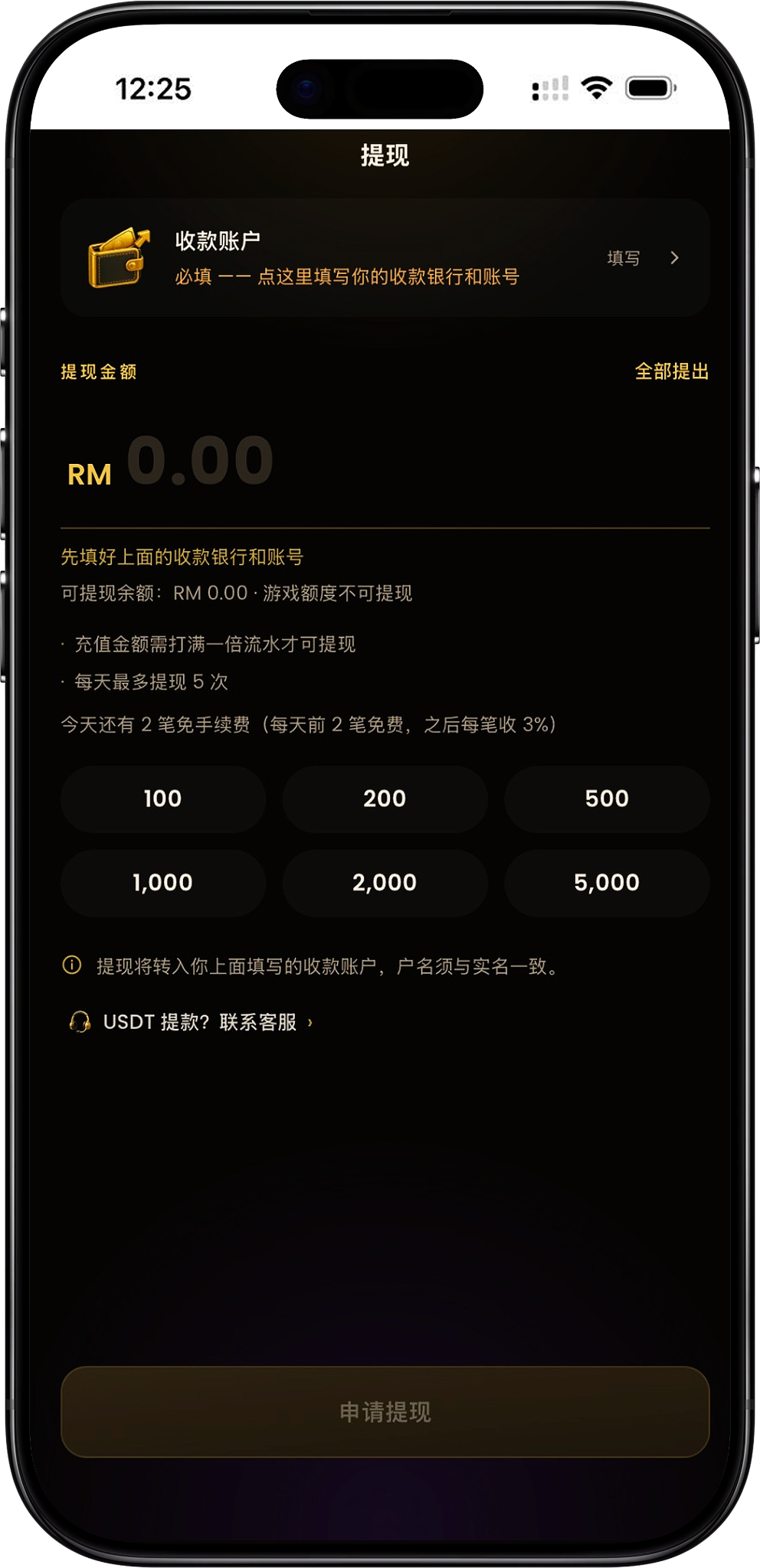
The main process for withdrawing from 68 NiuNiu is to first bind your receiving account, then confirm the withdrawable balance and enter an amount, and finally submit the withdrawal request. The first time you do this, check the bank or e-wallet name and account number carefully, as the receiving account page notes that it can only be filled in once.
Step 1: Enter the Withdrawal Page
After opening the 68 NiuNiu withdrawal page, first check the "Receiving Account" and "Withdrawable Balance" status. If you haven't filled in your receiving details yet, the page will prompt you to complete the bank or account setup above first.
Step 2: Tap to Fill in Your Receiving Account
Tap "Fill In" next to "Receiving Account" to enter the account details setup. The page will automatically show your real-name verification account name, which cannot be changed yourself.
Step 3: Select Your Bank or E-Wallet
Tap to select in the "Bank / Wallet" field, and choose your actual receiving channel from the list of banks and e-wallets currently provided on the page.
Step 4: Enter Your Own Account Number
Enter your own account number for the bank or wallet you selected. The page clearly states that withdrawals can only be made to your own account, so the account details must match your real-name verified identity.
Step 5: Save and Double-Check Your Details
Confirm that the bank or wallet, account name and account number are all correct, then save. The receiving account number can only be entered once by the user; any changes afterward require contacting customer service, so check carefully the first time you fill it in.
Step 6: Check Your Withdrawable Balance
Return to the main withdrawal page and check the "Withdrawable Balance". The page also distinguishes game credits and clearly shows that game credits cannot be withdrawn, so the actual amount you can apply for is based on the current withdrawable balance.
Step 7: Enter the Withdrawal Amount
Enter the RM amount you want to withdraw in the withdrawal amount field, or choose one of the quick amounts provided on the page, such as RM100, RM200, RM500, RM1,000, RM2,000 or RM5,000.
Step 8: Submit Your Withdrawal Request
After confirming that the receiving account, withdrawable balance and amount are all correct, tap "Apply for Withdrawal" to submit. Whether the button is active depends on whether your account already meets the requirements for a receiving account, balance and other withdrawal conditions.
How to Fill in Your Withdrawal Account
The withdrawal receiving account is required information. The platform uses your real-name verification details as the receiving account name, and requires you to select your own bank or e-wallet and enter the matching account number. Since this information directly affects whether you receive your funds, check every item carefully before filling it in for the first time.
Account Name Comes From Real-Name Verification
The receiving account page explains that the account name comes from your real-name verification and cannot be changed. This means you cannot enter a different name as the recipient when withdrawing.
Withdrawals Can Only Go to Your Own Account
The platform clearly states that withdrawals can only be made to your own account, so the bank or e-wallet you enter must belong to the person who completed the real-name verification.
The Receiving Account Number Can Only Be Entered Once
The page notes that the receiving account number can only be entered once by the user. If you later discover an error or need to switch channels, you cannot change it yourself again directly.
Contact Customer Service to Change Your Account
Once your receiving account number is saved, if you need to change your bank, wallet or account, follow the platform's instructions to contact customer service, rather than entering a new set of details yourself.
Supported Banks and E-Wallets
The 68 NiuNiu withdrawal page offers a variety of Malaysian banks and e-wallets to choose from. The actual channels available are based on the options shown when you open the withdrawal page.
Touch 'n Go eWallet
The withdrawal list includes Touch 'n Go eWallet. If you select this wallet, enter the account that belongs to you and matches your real-name verification details.
Major Banks in Malaysia
The current list includes Maybank, CIMB Bank, Public Bank, RHB Bank, Hong Leong Bank, Bank Islam, AmBank, Affin Bank, Alliance Bank, Bank Rakyat, BSN, OCBC Bank, HSBC Bank, Standard Chartered, UOB Malaysia, Agrobank, Bank Muamalat, MBSB Bank and Al-Rajhi Bank, among others.
Digital Banks and E-Wallets
The page also shows options such as GXBank, Boost Bank, AEON Bank, ShopeePay and GrabPay. When filling in your details, choose a channel you are actually using and that belongs to you.
Withdrawable Balance and the One-Time Turnover Requirement
The withdrawal amount is not calculated directly from the total balance in your account. The page shows the "Withdrawable Balance" separately, notes that game credits cannot be withdrawn, and requires top-up funds to reach a one-time turnover before they become eligible for withdrawal.
Top-Up Funds Must Reach a One-Time Turnover
The withdrawal page clearly states that "top-up funds must complete a one-time turnover before they can be withdrawn." So after topping up, you need to meet the corresponding turnover requirement before the funds enter the withdrawable range under the platform's rules.
Game Credits Cannot Be Withdrawn
The page clearly notes in the balance section that "game credits cannot be withdrawn." Game credits and withdrawable balance are therefore different states, and the two should not be combined directly when calculating your withdrawal amount.
The Withdrawable Balance Is What Counts
Before submitting a request, check the withdrawable balance shown on the page directly. If the amount shown is insufficient, having other types of credit in your account does not mean those credits can be withdrawn directly.
Withdrawal Limits and Fees
The withdrawal page also shows the daily withdrawal limit and fee information. It states that a maximum of 2 withdrawals are allowed per day, and that the first 2 each day are free while a 3% fee applies to each one after that. As both notices appear together on the page, the actual number of requests you can submit and whether a fee applies should follow the latest status shown on your withdrawal page that day.
Up to 2 Withdrawals Per Day
The rules section of the page shows "up to 2 withdrawals per day," so check how many withdrawals you've already used that day before deciding whether you can submit another request.
The First 2 Each Day Are Free
The page also shows "the first 2 per day are free" and indicates how many fee-free withdrawals remain that day, for example "2 fee-free withdrawals left today."
A 3% Fee Applies to Withdrawals After That
The fee notice also states "3% is charged for each withdrawal after that." Since the page also shows a maximum of 2 withdrawals per day, if your account allows further requests, always follow the fee and status shown by the system at the time.
Check That Day's Status Before Submitting
The withdrawal count and fee are important details that can affect the amount you actually receive, so check the remaining count, free withdrawals and fee notice shown on the page that day before submitting, rather than relying only on past rules.
USDT Withdrawal Instructions
The 68 NiuNiu withdrawal page also has a "USDT Withdrawal? Contact Customer Service" link. The page currently doesn't provide a fixed USDT address, self-service fields or complete withdrawal steps, so USDT withdrawals should not be handled through the regular bank withdrawal process.
Contact Customer Service for USDT Withdrawals
If you need to withdraw using USDT, contact Support through the customer service link on the withdrawal page, and proceed according to the process provided by customer service and the system at the time.
Do Not Use Bank Withdrawal Details in Place of USDT
Bank and e-wallet receiving details are used for regular RM withdrawals and are separate from the USDT withdrawal link. Users should not mix the two withdrawal methods.
68 NiuNiu Withdrawal FAQ
What do I need to do before withdrawing from 68 NiuNiu?
For your first withdrawal, fill in your receiving account first — including selecting your own bank or e-wallet and entering the matching account number — before entering an amount based on your withdrawable balance and submitting a request.
Can I use someone else's bank account for a withdrawal?
No. The page clearly states that the account name comes from real-name verification and that withdrawals can only go to your own account, so you must use a receiving account under your own verified name.
If I enter the wrong bank account number, can I fix it myself?
The page states that the receiving account number can only be entered once; any changes afterward require contacting customer service, so check it carefully before saving for the first time.
What withdrawal methods does 68 NiuNiu support?
The current page offers Touch 'n Go eWallet, several Malaysian banks, and some digital banks and e-wallets as receiving options, along with a USDT withdrawal contact-customer-service link.
Can I withdraw right after topping up?
Not necessarily. Current rules require the top-up amount to first reach a one-time turnover before the funds become eligible for withdrawal; the actual amount should also be checked against the withdrawable balance shown on the page.
Can game credits be withdrawn?
No. The withdrawal page clearly shows that game credits cannot be withdrawn.
How many times a day can I withdraw from 68 NiuNiu?
The page currently shows a maximum of 2 withdrawals per day. You can check your remaining withdrawals for the day on the withdrawal page.
What is the withdrawal fee?
The page currently shows the first 2 withdrawals each day are free, with a 3% fee on each one after that. Since the same page also notes a maximum of 2 withdrawals per day, always follow the latest notice on the system page that day for the actual fee and number of requests available.
Can I withdraw using USDT?
The page provides a USDT withdrawal contact-customer-service link. If you need this, contact platform customer service first for the current process, rather than using the regular bank withdrawal steps directly.
Why can't I tap the withdrawal request button?
The request button may be inactive if you haven't filled in your receiving bank and account number, don't have enough withdrawable balance, or haven't met the withdrawal conditions. Complete the relevant details and conditions as prompted on the page first.
Apply for 68 NiuNiu Withdrawal
First bind your own bank or e-wallet receiving account, confirm the one-time turnover and withdrawable balance, then enter the withdrawal amount and submit your request based on the day's remaining count and fee status.